Friday, October 18, 2013

Tutorial - Raid setup on Dell - R710 using PERC H700 card

I embarked on a building a test Hyper-V machine and debated a lot on what an optimal Raid configuration should be. After much thought I decided to go with  RAID 1 for the OS and RAID 10 for the data store drive on which I will be running my VM's.

The RAID card I have is PERC H700 card but the same can be applied to  PERC 6/i Integrated card as well.

H/W info - 6 bays

0 and 1 - 180 GB disks, OS, RAID 1
2,3,4,5 - 500 GB disks, DataStore, RAID 10

Launch the config utility - by pressing Ctrl+R


This utility will have three TABs on the top.

  • VD Mgmt – Virtual Disk Management, which will be selected by default.
  • PD Mgmt – Physical Disk Management
  • Ctrl Mgmt – Controller Management

If this is brand new setup you will see "No configuration present" if you are re-purposing an inherited H/W you might see the older setup. Please backup the data before you wipe out the existing configuration. Also the physical disks are displayed in the raw format.


When the new virtual disk VD creation is initiated you can see the below screen with the following options for Virtual Disk Management - 

  • RAID Level
  • PD Per Scan
  • Secure VD
  • Physical Disks Section

Basic Settings

  • VD Size
  • VD Name

Advanced Settings

  • Stripe Element Size
  • Read Policy
  • Write Policy
  • Force WB with no battery
  • Initialize
  • Configure Hot Spare


Chose RAID option - 

  • RAID-0
  • RAID-1
  • RAID-5
  • RAID-6
  • RAID-10
  • RAID-50


Press TAB to select the next option, Disk selection


Name the VD group  in my case its HyperV_OS and VM_DataStore.

I would recommend leaving all the advanced settings to the default values. if you want to config a spare go ahead and select that option.
  • Stripe Element Size – Default value is 64KB
  • Read Policy – Default value is Adaptive R
  • Write Policy – Default Value is “Write Back”
By default, following values are not checked. i.e check-box not selected
  • Force WB with no battery
  • Initialize
  • Configure HotSpare
Press TAB to jump to OK and press enter.  You’ll get the following warning message. Click OK to continue. This will successfully create the new Virtual Disk with RAID-1 configuration.


To view the configuration select the VD label as below and hit enter. Also once the VD group is setup the initialization of the disks will begin as well.


Once the VD is created, you’ll see a new ‘Disk Group 0′ under ‘PERC H700′. There will be a progress bar next to the ‘Virtual Disk 0′ showing the progress of the initialization.


Continue to create a second VD group for VM_DataStore. Pay attention to the VD group properties (Right hand side - yellow) how they are populated which will help you down the lane to setup additional disks or RAID controllers.


Hopefully someone would find this useful.

Friday, April 5, 2013

Unable to RDP to windows 7 (Lenovo) machine

My company recently purchased few Lenovo laptops and desktops. They came in with Windows 7 OEM install image. I was not able to RDP into few of those machines and further research led me to the below missing registry key.

HKEY_LOCAL_MACHINE\SYSTEM\CurrentControlSet\Control\Lsa

and the value for Security Packages should be


kerberos
msv1_0
schannel
wdigest
tspkg
pku2u

if you have similar issue just copy the above and update the field.


Wednesday, December 7, 2011

Windows 7 black screen after logging in via RDP.

I had this issue couple of day ago...there are many blogs out there how to deal with this black screen issue but the scenario I had was different. Based on going through multiple blogs users having ATI or GForce graphic cards were primarily affected, users having dual screens are also in soup. In my case I had a Intel card and my issue was black screen does not appear for all the users. For example user1 has no problem what so ever he was able to login and work but then user2 logs in all he sees in a black screen when he remotes in. I tried to disable bitmap caching, disable turn off monitor in power settings, disable power management to NIC as suggested by some folks. Nothing worked.

So I ended by deleting that particular user's profile (folder and registry) as per my previous blog and he was able to log in and issue did not happen. Also what I observed was user2 did not log in for quite some time and the issue came up again. Maybe the amount to time between the remote log in has some connection to getting black screen.

If you guys have any input I welcome it.

Monday, October 24, 2011

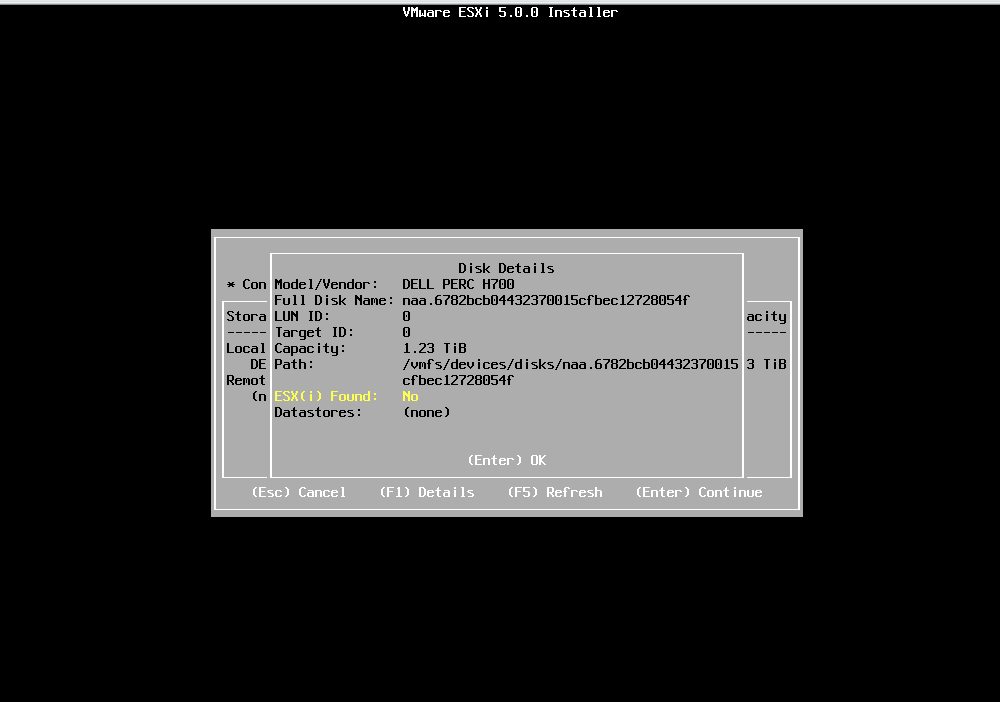
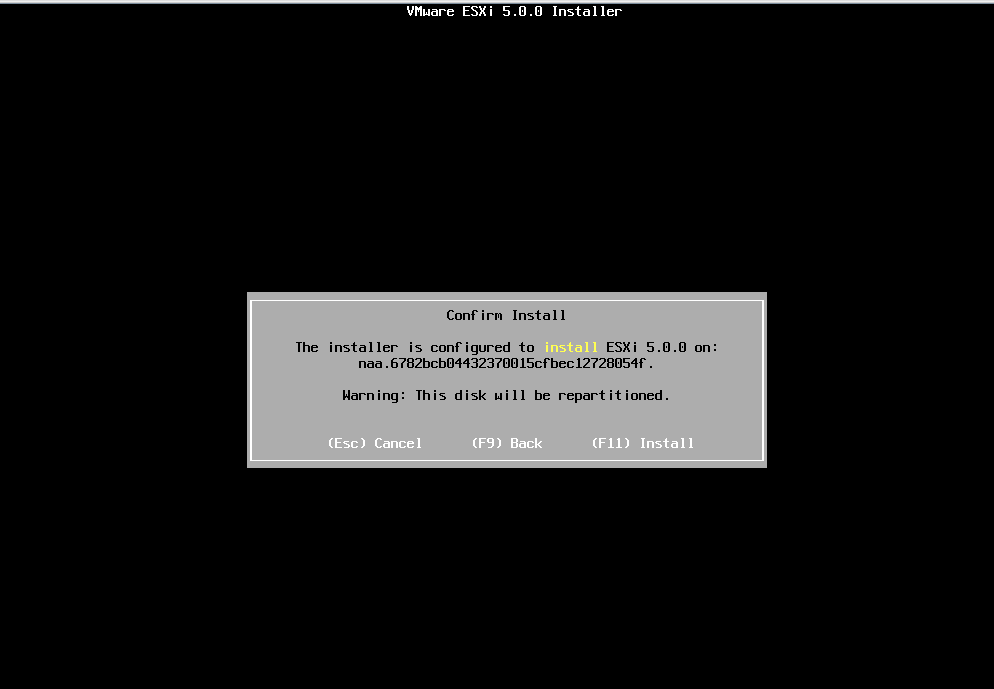
Installing vSphere 5.0 ESXi hypervisor.

This post is regarding how to install vSphere 5.0 hypervisor on dell server. The installation is pretty straight forward. I download the software from vmware website and burnt it on a cd...booted the server for cd and installed it. Since the installation was to local drives (no SAN involved) it detected the disk fine. I will soon install it on SAN configuration as well and post the pictures. Below are the screenshots.


Monday, August 1, 2011

Failed to create the configuration database. Invalid or loopback address error.

When setting up SharePoint 2010 I encountered the below error -

The SQL 2008 server I was using had a instance already set, up and running and was listening on port 1433. Since I did not have any other SQL servers I decided to set up a second instance on the box and assigned it to listen on port 1984. During the installation of SP 2010 after providing the db connection string I got the above error.
The way conn string is provided -  

Servername.FDQN\sqlinstance,Port Number
Example -  server1.xyz.com\testdb,1984

The way to resolve this error is first System DSN needs to be configured on the SP server. The below configuration is for 64 bit server. If you have 32 bit server you can go directly to Admin tools - Data Sources and set up the system DSN.


Again the server name can be FDQN like server.xyz.com\dbtest.
Select Client Configuration

Uncheck Dynamically det port and manually give the port number that was assigned.

So going back to the SP 2010 install now give the conn string as
server1.xyz.com\dbtest and that should resolve the issue. Make sure the id used to install SP 2010 and making this sql connection has dbcreator and securityadmin role on the db instance.

Monday, July 25, 2011

Windows update Error 0x8007f004

Last week I had the need to bring in a Win 2003 server into my Win 2008 domain to support a legacy application that refuses to run on Win 2008 R2 server.
After building the server and adding it to the domain while applying the windows updates I got "Unable to apply the updates - Failed and Error 0x8007f004"
The primary reason for this is because administrators need to have permissions on the following policies
Local Policies > User Rights Assignment
1. Back up files and directories
2. Debug programs
3. Restore files and directories
4. Manage auditing and security log
5. Take ownership of files or other objects
In my case I updated permissions on group policy at domain level "Manage auditing and security log" for an issue I was having with SharePoint and mistakenly removed Administrator group and added "Domain admin" group.
Added back the Administrator group and the updates ran fine.

Sunday, July 24, 2011

How to delete a user profile in Vista, Windows 7 and Windows 2008?

Apart from going to the Users folder and deleting the profile one must also go to the registry as shown below and delete the key corresponding to that user. In my case I needed to know a SID of a user after the user was disabled and deleted from AD. Looking at the profileImagePath one can cross check the user associated with the SID.

HKEY_LOCAL_MACHINE\SOFTWARE\Microsoft\Windows NT\CurrentVersion\ProfileList

[HKEY_LOCAL_MACHINE\SOFTWARE\Microsoft\Windows NT\CurrentVersion\ProfileList\S-1-5-21-1659004503-1788223648-1417001333-500]
“ProfileImagePath”=”%SystemDrive%\Documents and Settings\User1”
“Sid”=hex:01,05,00,00,00,00,00,05,15,00,00,00,57,66,e2,62,a0,20,96,6a,75,b9,75,54,f4,01,00,00
“Flags”=dword:00000000
“State”=dword:00000100
“CentralProfile”=”"